This will only work on the weekend of 14/15th March 2015
A great looking hat is currently available for free on Roblox.com and I am going to show you how to get it. It will take you under one minute!
In your search engine, type in http://www.roblox.com/promocodes or click here to be directed there now.
Where it says "enter code", type in the following: SXSW2015
Then click redeem. It should now say you have the hat! Make sure you check that it is definitely in your inventory.
This hat was only supposed to be available to people that attended the You Make the Game: UGC and the Next Wave of Play' talk at SXSW, but the code was leaked so now loads of people are redeeming the hat. JackInTheBlox even posted the code on his Twitter.
I hope this helped you and if you have any questions feel free to comment below or message me on Roblox, link to my account below.
-Bobstar500 (http://www.roblox.com/User.aspx?ID=4085831)
Showing posts with label how. Show all posts
Sunday, 15 March 2015
Saturday, 14 February 2015
How to put Social Network Links on your Roblox Profile!
A fantastic new Roblox update allows users to put links to their social network sites onto their Roblox profile! I am going to show you just how easy it is to add them.
Below you can see what the links look like on Shedletsky's profile.
Now scroll down and they should be there! You can see the link to my YouTube channel is now on my Roblox profile!
I would recommend that you click on the links yourself to check that they are working.
This is a really good Roblox update, because it allows users to easily share their social networking sites with their Roblox friends. I would like it if Roblox added more websites that people can share, such as Blogger and Tumblr. I hope this helped you and if you have any questions please comment below or message me on Roblox, click on my name below to be directed to my profile.
-Bobstar500
Below you can see what the links look like on Shedletsky's profile.
First, click on the settings cog on the top right of the websites and click on settings.
Next, under my account select the "social" tab.
You can now copy and paste the links of your YouTube and Twitch channels, Facebook page or account and Twitter profile. You can also select who these links are visible to, such as only your friends or followers. Do not put links to inappropriate pages or else you may get permanently banned from Roblox. You can see below that I have typed in my YouTube URL. Once you are finished, click "update".
When you click back on your profile, you will notice that the links are still not there, but don't worry, they are just hiding. To see them yourself, you have to click "View public profile" above your avatar on your profile.
I would recommend that you click on the links yourself to check that they are working.
This is a really good Roblox update, because it allows users to easily share their social networking sites with their Roblox friends. I would like it if Roblox added more websites that people can share, such as Blogger and Tumblr. I hope this helped you and if you have any questions please comment below or message me on Roblox, click on my name below to be directed to my profile.
-Bobstar500
Sunday, 1 February 2015
Spongebob Squarepants hat on ROBLOX!
*This is no longer a necessary way to obtain the hat because Roblox have released it in the catalog for 1 Ticket*
Do you want to look as cool as me, with this little Spongebob on your Robloxian's shoulder? Well now you can, because I'm going to show you how to get the Spongebob Squarepants hat on Roblox for free!
Log onto Roblox.com and sign into your account. You don't need to be a builders club member to get the hat. Now copy and paste this link into the URL box: http://www.roblox.com/advertising/grant-asset?assetId=208660809
This message should now pop up, confirming that you have been rewarded the hat.
When you click "ok", it will then take you to the Spongebob Squarepants movie 2 website. The hat should now be in your inventory for you to wear!
Hat review:
Personally I think the hat is a bit too small and would possibly be better as a package, but as a Spongebob fan I still really like it! It will probably be available until the film is no longer being shown at the cinema. I think it would be cool if Roblox also release similar hats for the other Spongebob Squarepants characters, as I know that a lot of people would like to collect them all, including myself!
If you have any questions then leave a comment or message me on Roblox, link to my profile below.
-Bobstar500
Do you want to look as cool as me, with this little Spongebob on your Robloxian's shoulder? Well now you can, because I'm going to show you how to get the Spongebob Squarepants hat on Roblox for free!
Log onto Roblox.com and sign into your account. You don't need to be a builders club member to get the hat. Now copy and paste this link into the URL box: http://www.roblox.com/advertising/grant-asset?assetId=208660809
This message should now pop up, confirming that you have been rewarded the hat.
When you click "ok", it will then take you to the Spongebob Squarepants movie 2 website. The hat should now be in your inventory for you to wear!
Hat review:
Personally I think the hat is a bit too small and would possibly be better as a package, but as a Spongebob fan I still really like it! It will probably be available until the film is no longer being shown at the cinema. I think it would be cool if Roblox also release similar hats for the other Spongebob Squarepants characters, as I know that a lot of people would like to collect them all, including myself!
If you have any questions then leave a comment or message me on Roblox, link to my profile below.
-Bobstar500
Saturday, 15 November 2014
Mad Paintball by Loleris Grand Opening Review - ROBLOX
There was a massive new game release today, so big it messed up ROBLOX's front page and the "visiting count". Mad Paintball is Loleris's first major new game release since his extremely popular game "The Mad Murderer" came out earlier this year. The excitement just before the game was released was crazy, with loads of people playing on the testing server all day along side Loleris, who was making last minute adjustments. People were, and still are, commenting on the game almost every single second, with the game receiving more comments than most new ROBLOX catalog items! Just one hour after release, Mad Paintball made it to the front page of the games page.
Within seconds of release, the game already had 5 pages of servers, with each server holding 20 people. Some servers glitched, allowing 21 and even 22 people into a single game, as so many people were joining at the same time.
Other famous Robloxians such as SmoothBlockModel took part in the grand opening party, as well as Loleris himself, attracting thousands of players.
Loleris also released an advert for the game, which helped attract players.
On the right you can see that it says more players are online than the game has ever been visited. This just shows how popular the game already is!
And below you can see a screenshot of me playing the test server for Mad Paintball along side Loleris, just minutes before the main game was released!
So far the game has received fairly positive feedback, currently with 221 thumbs up and 55 thumbs down, many of the people disliking the game being haters of Loleris and not because they dislike the game. Some people dislike the fact that you can not jump, and also that you die if you fall into the pool. There are also many bugs and glitches as the game is new, however these will soon be fixed.
Loleris says that upcoming updates include:
-New round types! -Plenty of maps! -New Characters! -New Accessories!
As it stands, the game is very similar to existing paintball games, such as Daxter33's "Paintball!", ScriptOn's "Paintball Testing" and Miked's "Ultimate Paintball", however in the future the game will hopefully become more unique and very likely become extremely popular.
Thanks for reading, feel free to comment below and share your thoughts on Loleris's newest game!
Here is the link to Mad Paintball: http://www.roblox.com/MAD-PAINTBALL-GRAND-OPENING-place?id=186976759
Stay tuned for more ROBLOX news
-Bobstar500
Saturday, 8 November 2014
How to get Gear on ROBLOX for Verifying your e-mail
If you log on to ROBLOX any time this week you will see this notification on your home page:
To find out more you can click the link to the forum or click on your "Notifications" in your inbox to read this message:
So basically, ROBLOX are making some security improvements for people's accounts, which means you must verify your e-mail. To try to persuade people to do this, they will give players with a verified e-mail address a free hat, seen below.
Strange that it says the hat was created in 2012, it must have just never been released.
The notification explains how you check if your e-mail address is verified, it is very easy to do and takes under a minute, so it's worth doing. In my opinion, ROBLOX should just make people verify their e-mail as soon as they make their account.
The hat will be given out on November 17th. I am not sure why it says "Get Gear No One Else Has" when the item you get is a "hat", and almost everyone on ROBLOX will have it as most people will have verified their e-mail addresses. So the ROBLOX notification is not really true.
Anyway, I hope this helps you. Thanks for reading!
-Bobstar500
To find out more you can click the link to the forum or click on your "Notifications" in your inbox to read this message:
So basically, ROBLOX are making some security improvements for people's accounts, which means you must verify your e-mail. To try to persuade people to do this, they will give players with a verified e-mail address a free hat, seen below.
Strange that it says the hat was created in 2012, it must have just never been released.
The notification explains how you check if your e-mail address is verified, it is very easy to do and takes under a minute, so it's worth doing. In my opinion, ROBLOX should just make people verify their e-mail as soon as they make their account.
The hat will be given out on November 17th. I am not sure why it says "Get Gear No One Else Has" when the item you get is a "hat", and almost everyone on ROBLOX will have it as most people will have verified their e-mail addresses. So the ROBLOX notification is not really true.
Anyway, I hope this helps you. Thanks for reading!
-Bobstar500
Monday, 13 October 2014
Roblox Comment Glitch 2014!
*ROBLOX HAVE NOW FIXED THIS GLITCH, IT NO LONGER WORKS*
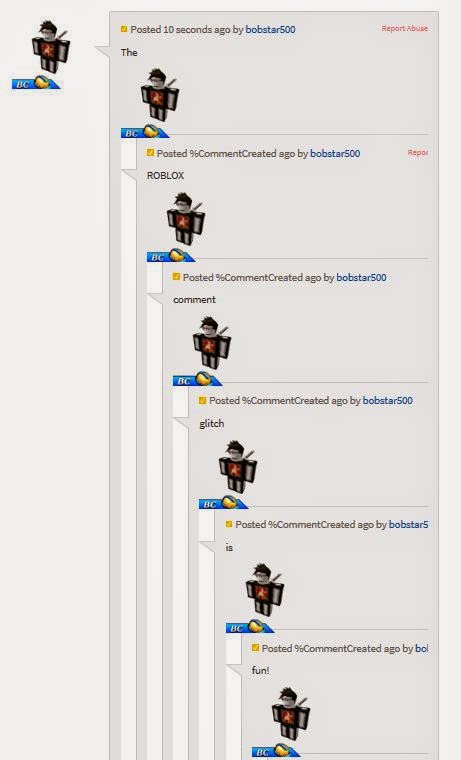
Hey Robloxians, I'm sure you have all seen the new glitch in the ROBLOX comments where it links loads of your comments together? Well I'm here to show you all how to do it! Here's what it looks like:
Thanks for reading and I hope this helped, leave a comment if you have any issues.
Hey Robloxians, I'm sure you have all seen the new glitch in the ROBLOX comments where it links loads of your comments together? Well I'm here to show you all how to do it! Here's what it looks like:
Here is how to do it.- Make sure your account has a verified e-mail address or else you can not comment!
- Go to the comment section of any game, catalog item or plug-in/model. A good place to try it out first is on your own ROBLOX game so you can perfect it without many people seeing.
- Then comment what you want, but where you want each comment to split type this: $`
- There is no space bar between the $ and the `
- Do put a space between your last word and the $` for example: Hello world $`
- BEWARE that the ` is not an apostrophe, it is the button up by the top numbers on most keyboards.
- Here is an example of what you could type. Hello $` World $` how $` are $` you? $`
- Then press comment and refresh the page to see the pictures of your avatar.
Thanks for reading and I hope this helped, leave a comment if you have any issues.
Friday, 12 September 2014
How to get More Credits on Super Bomb Survival - ROBLOX
The newest game to dominate the front page of the games list on ROBLOX.com is, as I'm sure you have all ready seen, Super Bomb Survival!!! created by TylerMcBride. The aim is to survive for as long as you can in a arena full of crazy exploding bombs and rockets and other life threatening disasters. By surviving, you can earn your character in-game credits to spend on boosts, skills and perks (go to the information building in the game to find out what these do if you don't all ready know). I have found an easy way to collect credits quicker and easier and would like to share this useful information with you!
Thanks for reading and stay tuned for more tutorials, cheats and other news!
-Bobstar500
- Okay, so you will need to have some credits to start with, so play the game normally for a few rounds until you have around 100 credits.
- After the round, walk over to the "Survival shop" (pictured above) and click on "Boosts". Scroll down until you see the "x2 Win Credits" boost.
- Buy it for 20 credits. This gives you double the amount of credits you normally get when you finish the next round. THIS ONLY LASTS FOR ONE ROUND.
- So for example, if you survive the whole round, instead of getting 50 credits you will receive 100 credits. If you die early on, normally you would only get around 20-30 credits, but with the boost you will still receive double that amount, so every round you will be making a profit!
- So make sure after every round you go straight back over to the survival shop and buy the boost again for the next round! You could also buy another boost or power-up to make it even easier to survive, and also keep an eye out for credits lying around in each map!
Thanks for reading and stay tuned for more tutorials, cheats and other news!
-Bobstar500
Saturday, 14 June 2014
How to dance on Roblox (2 new dances)
You often see loads of people dancing on Roblox games, but how do they do it?
I will now show you the secret, it's really easy when you know how!
Thanks for reading and stay tuned for more Roblox news, tips and cheats!
Bobstar500
I will now show you the secret, it's really easy when you know how!
- Sign into your account. you must be able to type and see the chat menu in games, so make sure you are over 13. Go onto a Roblox game. You can not be a guest to dance.
- Once fully loaded, make sure you are zoomed out a little and not in first person.
- Click "/" or click on the black chat bar at the bottom of the screen and type in /e dance and press enter. Do not write in capitals or it will not work. Make sure you put a space between the "e" and "d" of "dance". Do not type anything else in the same sentence or else you will not dance. Make sure your character is standing still when you write the message. When you walk, you will stop dancing. Also, when you type it correctly it will not appear on the chat menu on the top left corner of the screen.
- It does not always work first time, but keep trying and it should work eventually. If it does not work on one game, try it on a different place.
- Bored of the Gangnam Style dance? Then try out the two new dances. Type in either /e dance2 or /e dance3 but do not put a space between the "dance" and the number.
Thanks for reading and stay tuned for more Roblox news, tips and cheats!
Bobstar500
Thursday, 1 May 2014
Roblox Invisible Glitch
This post will explain how to make your character invisible on the Roblox website. It DOES NOT make your avatar invisible in games.
(taken from Merely)
Keep pressing "Click here to re-draw it" button under your character once you are in your outfit until it works. There are also some funny shirts you can buy from the catalog to make your character look like a stick man etc. Type in "Stick man" or "Invisible clothing" in the catalog to find the shirt you want to wear!
Thanks for reading and stay tuned for more updates and glitches here on this blog!
Bobstar500
(taken from Merely)
Keep pressing "Click here to re-draw it" button under your character once you are in your outfit until it works. There are also some funny shirts you can buy from the catalog to make your character look like a stick man etc. Type in "Stick man" or "Invisible clothing" in the catalog to find the shirt you want to wear!
Thanks for reading and stay tuned for more updates and glitches here on this blog!
Bobstar500
Thursday, 20 March 2014
How to throw the knife on Murder Mystery
Just a quick post, thanks for reading!
Click this link to play Nikilis' Murder Mystery game on ROBLOX.com! http://www.roblox.com/Murder-Mystery-v0-4-2b-Beta-place?id=142823291
-Bobstar500
Monday, 29 July 2013
Percy Jackson Sea of Monsters on Roblox!
If you don't already know, Roblox has teamed up with the new movie, Percy Jackson Sea of Monsters. Two hats, a golden fleece (from the film), a special version of the popular game created by Shedletsky "Sword fights on the heights" (SFOTH) and a whole page are dedicated to the film. In this post I will show you how to win the fleece and show you all of the items released to celebrate the film which is released August 7th!
The two hats released don't look that amazing to be honest, the Despicable me 2 items were a lot better, however they only cost 1 ticket. To buy them click the catalog and search for them there.
You can also get this billboard for your own games for free!
To find the Percy Jackson Roblox page click on more at the top bar and click on the icon saying Percy Jackson Sea of Monsters as shown below.
That Will take you to the page below showing the trailer for the film, links to the items and SFOTH game along with information about the film.
In the next part of this blog I will show you how to get all of the swords to unlock the secret golden fleece, so if you want to work it out for yourself, don't read this next part.
First click on the game shown below on ROBLOX.com. (click here to go to the game).
When you join the game this notice will appear:
Basically, to win the fleece and earn a badge you have to find the 4 swords without dying, but if you die you have to start again. You can get killed by other players or kill them first on your quest. If you are familiar with SFOTH IV then this will be easy as the swords are hidden in the same places as that game. Each sword is hidden in two places, I will show you one of their places.
One sword is hidden here, along the disappearing panels and spinning poles.
Another is hidden next to the main arena and floating panels.
One is at the top of the escalators, between the columns where the Illumina is hidden on the original.
The axe sword is at the end of the high, thin paths at the far end of the map.
And the last is inside the mountain where the Darkheart is often hidden...
...In here
Once you have successfully gathered all of these swords, this notice will come up confirming that you have unlocked the Golden Fleece, badge and have the ability to fly!
So now you can fly and easily kill your enemies to stop them winning the fleece, but don't die or else you will loose that too! Have fun completing this task and I hoped I helped.
Here is what the film is about.
"Percy Jackson, the son of Poseidon, continues his epic journey to fulfill his destiny, as he teams with his demigod friends to retrieve the Golden Fleece, which has the power to save their home and training ground, Camp Half-Blood. They embark on a dangerous journey into the Sea of Monsters (known to humans as the Bermuda Triangle) to search for the Golden Fleece."
Thanks for reading, and stay tuned for more Roblox updates, cheats and news!
Monday, 8 July 2013
Subscribe to:
Posts (Atom)