Showing posts with label glitch. Show all posts

Saturday, 25 April 2015

Funny Roblox Catalog Glitch

This is hilarious.


The new limited hat "Eye Snake Shades" have glitched out so that no one can buy them. This has happened in the past, with items such as the Riptide. This is not a hack or anything, it is just something faulty at Roblox's end. Anyway, some guy called phramed put all four of his shades up for sale for R$1 because he was annoyed that they were "failing". Now he is unable to take them off sale or trade them.


His selling price is well under the original R$100 they were originally selling for. Because of the glitch, no one can purchase his cheap hats and the comment section is on fire. Hundreds of raging Robloxians calling phramed "a hacker" and reporting his account. Obviously he did not do this on purpose, but people are getting very angry in the comment section and on the forums, as seen below. Anyway. once the glitch is fixed, four lucky people will buy his shades for R$1 each.


Thanks for reading, stay tuned for more Roblox news, updates and info!

Monday, 13 October 2014

Roblox Comment Glitch 2014!

*ROBLOX HAVE NOW FIXED THIS GLITCH, IT NO LONGER WORKS*

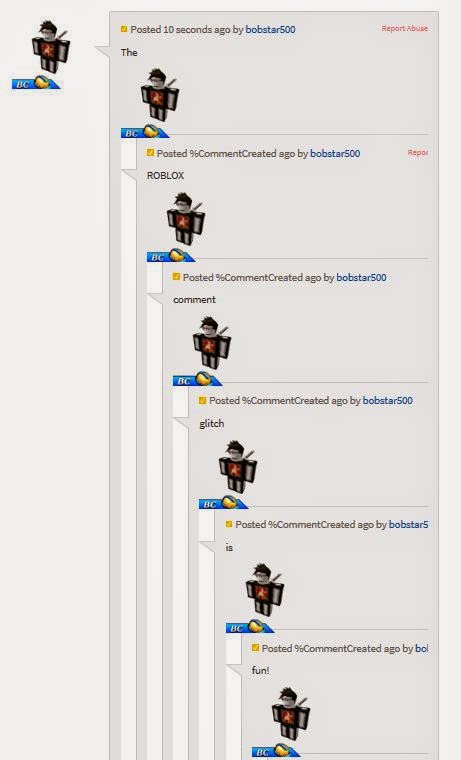
Hey Robloxians, I'm sure you have all seen the new glitch in the ROBLOX comments where it links loads of your comments together? Well I'm here to show you all how to do it! Here's what it looks like:


Here is how to do it.

  1. Make sure your account has a verified e-mail address or else you can not comment!
  2. Go to the comment section of any game, catalog item or plug-in/model. A good place to try it out first is on your own ROBLOX game so you can perfect it without many people seeing.
  3. Then comment what you want, but where you want each comment to split type this: $`
  4. There is no space bar between the $ and the `
  5. Do put a space between your last word and the $` for example: Hello world $`
  6. BEWARE that the ` is not an apostrophe, it is the button up by the top numbers on most keyboards.
  7. Here is an example of what you could type. Hello $` World $` how $` are $` you? $`
  8. Then press comment and refresh the page to see the pictures of your avatar.
Stickmasterluke says ROBLOX are aware of the glitch and are fixing it, so make the most of it whilst you can! Also do not use the glitch inappropriately as you may get banned.

Thanks for reading and I hope this helped, leave a comment if you have any issues.


Thursday, 1 May 2014

Roblox Invisible Glitch

This post will explain how to make your character invisible on the Roblox website. It DOES NOT make your avatar invisible in games.

(taken from Merely)

Keep pressing "Click here to re-draw it" button under your character once you are in your outfit until it works. There are also some funny shirts you can buy from the catalog to make your character look like a stick man etc. Type in "Stick man" or "Invisible clothing" in the catalog to find the shirt you want to wear!

Thanks for reading and stay tuned for more updates and glitches here on this blog!

Bobstar500

Friday, 14 June 2013

Roblox mobile update glitch

If you've been on the App Store recently you will have noticed that there is an update for roblox mobile. The update lets you play as a guest and have fixed some bugs (and in doing so created a new one!). Basically, if you sign in to your account, on the home screen it tells you how many Robux and tickets you have. You probably have around 1000 or so, however look what it says on the app!
10 500!!! How?!?

I've logged in on other accounts and it says the same thing!!!!
This sounds pretty amazing right?
WRONG!
If you then click on your profile look what it says then...
(I know I don't have many, I bought a very expensive tie...)
So basically you haven't got any extra tix, it just says you do. Annoying, I know...

Anyway, that's it for this, have a nice day!

Remember to stay updated for more cheats, glitches and news!